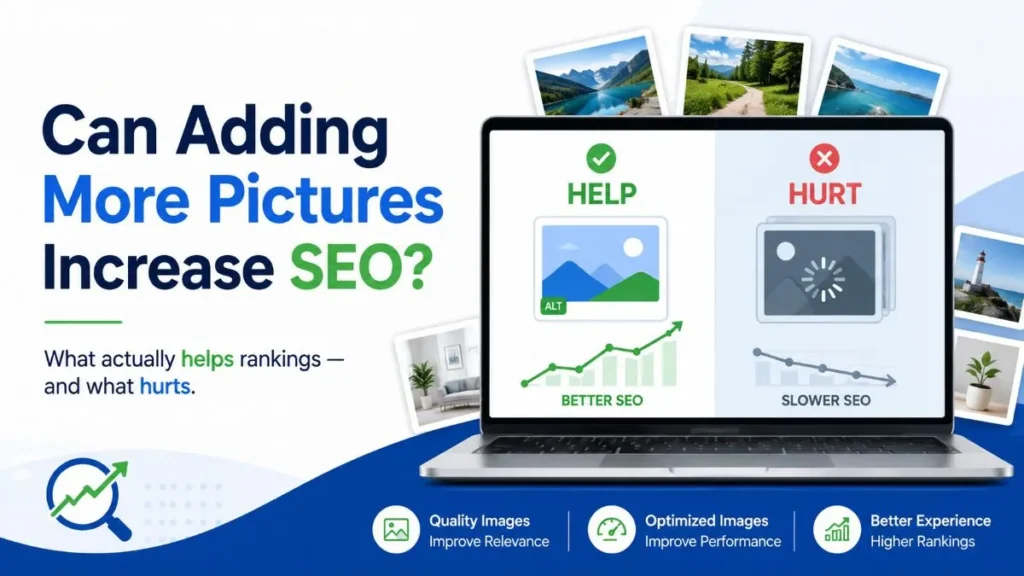
What actually helps rankings, what can hurt performance, and how to decide whether your page needs another image.
| The short answer Yes — adding more pictures can help SEO when the new images make the page more useful, clearer, more trustworthy, or more discoverable in image-based search. But Google does not publish a ranking bonus for raw image count. If an extra image adds no information or makes the page slower or harder to use, it can work against the result you want. |
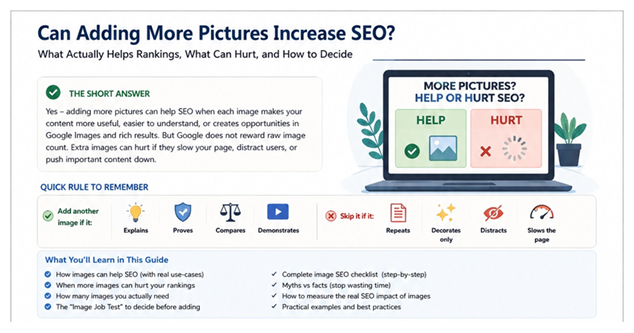
If you came here because your page feels too text-heavy, do not fix that by uploading five random stock photos. Find the places where a visitor is most likely to think “show me,” “prove it,” “what does that look like?” or “which option is better?” Those are the places where a picture can earn its space.
Can Adding More Pictures Increase SEO? The Real Answer
Yes — but only when the extra pictures improve the page. If you are thinking, “My article has three images, so maybe ten will rank better,” that is the wrong target. Google’s published image guidance focuses on relevance, quality, discoverability, surrounding text, descriptive alt text and filenames, technical delivery, and overall page experience. It does not prescribe a minimum number of pictures.
Primary reference: Google Image SEO best practices
Does Google reward pages for having more images?
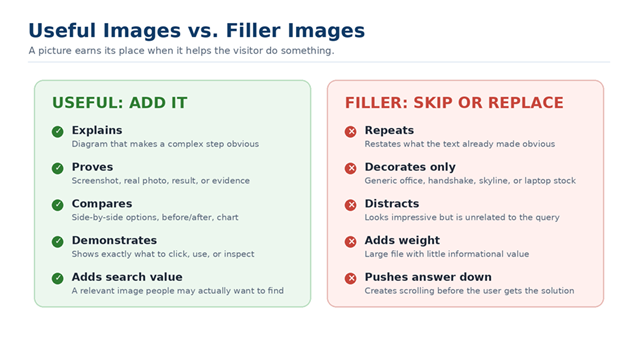
There is no useful “image quota” to chase. A page with two original diagrams that solve real problems can be stronger than a page with twenty generic photos. The safest rule is simple: every image needs a job. It should explain, prove, compare, demonstrate, add relevant visual-search value, or support a feature that genuinely needs an image.
Three outcomes people often mix together as “image SEO”
| Outcome | Can pictures help? | What actually changes |
| Normal organic page performance | Potentially | Useful visuals can strengthen the page’s usefulness, clarity, evidence, and page experience. |
| Google Images visibility | Yes | Crawlable, relevant images can appear in image search and send visits to the page. |
| User experience / conversion | Yes | A diagram, screenshot, product view, or proof image can answer questions faster and reduce uncertainty. |
| Important distinction A picture is not a magic “ranking boost.” The useful question is not “How many images should I add?” It is “What does the visitor need to see that text alone is not doing well enough?” |
6 Ways Useful Images Can Help SEO
1. Create another route into your site through Google Images
A useful, crawlable image can earn visibility in Google Images. That matters most for topics where people genuinely want to see the answer: tutorials, products, design examples, charts, travel, recipes, local work, before-and-after results, and visual comparisons. The image should be relevant to the page and surrounded by text that makes its subject clear.
2. Make difficult information easier to understand
When a paragraph is forcing the reader to build a mental picture, a diagram or screenshot can do the job faster. Use visuals where a user needs to understand a process, interface, comparison, layout, result, or relationship. This is a real user benefit; there is no need to turn it into an unsupported “dwell time equals rankings” claim.
3. Give Google more context about the page
Google says it extracts information about an image from the page around it, including captions and image titles, and recommends placing images near relevant text. Descriptive filenames and accurate alt text also help describe the subject. The goal is clarity, not repeating the same keyword in every field.
4. Create original assets other sites may want to reference
Original charts, diagrams, process visuals, maps, comparison graphics, and research illustrations can become genuinely cite-worthy assets. A stock photo rarely earns a reference because it contributes little that is unique. A useful visual does not guarantee links, but it gives people something worth citing.
5. Support eligible search features
Images are important for several search experiences, including image results and certain structured-data features such as products, recipes, and articles. Use the structured data that matches the page type, and make sure the image itself accurately represents the content. Do not add markup simply because a plugin offers it.
6. Create more opportunities in Google’s AI-powered Search experiences
Google’s 2026 guidance for generative Search features says the same SEO fundamentals still apply and specifically recommends supporting text with high-quality, relevant images and video when it makes sense. That creates additional ways for a site to appear beyond a standard blue link. The opportunity comes from useful media, not a special “AI image hack.”
Current Google guidance: Optimizing for generative AI features
When Adding More Pictures Can Hurt SEO
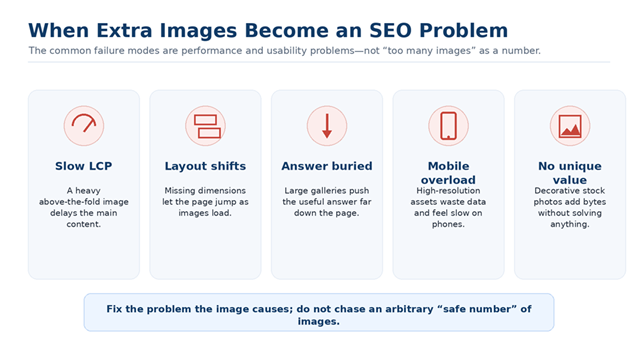
The problem is usually not “too many” in the abstract. It is what those extra files do to the page. A useful image can still be badly implemented; a beautifully compressed image can still be useless to the reader.
A heavy above-the-fold image can hurt loading performance
If the largest visible element is an image, it may become the page’s Largest Contentful Paint (LCP) element. Google’s Core Web Vitals guidance says a good LCP is 2.5 seconds or less for at least 75% of page loads. Do not blindly lazy-load the main above-the-fold or LCP image; delaying that request can make the key content appear later.
Core Web Vitals thresholds • Image performance guidance
Missing dimensions can make the page jump
Images without reserved space can contribute to Cumulative Layout Shift (CLS). Add width and height attributes so the browser knows the aspect ratio before the file finishes loading. A good CLS score is 0.1 or less at the 75th percentile.
Decorative images can bury the actual answer
A visitor searching a yes/no question should not have to scroll through a huge hero, a generic office image, another stock photo, and a gallery before reaching the answer. Visuals should support the answer, not delay it.
Large assets can be especially expensive on mobile
Do not send a huge desktop original simply because WordPress can visually scale it down. Serve appropriately sized responsive images so smaller screens are not forced to download more bytes than they need.
| Do not use a fake “safe size” rule There is no universal rule such as “every image must be under 100 KB.” Use the smallest practical file that preserves the required quality, dimensions, and purpose. A detailed product photo and a tiny icon do not need the same budget. |
How Many Images Should a Blog Post Have?
There is no SEO-safe formula such as “one image every 300 words.” The right number depends on what the user needs to see. A screenshot-heavy tutorial may need many images. A simple answer may need one or two. A research post may need charts. A service page may need real work examples. Count jobs, not pictures.
Use the Image Job Test before adding another picture
Ask these five questions. If the picture clearly passes at least one of the first four and also passes the performance test, it has a reason to exist:
- Does it explain something faster or more clearly than text?
- Does it show proof, first-hand evidence, or a real example?
- Does it help the visitor compare, choose, or complete a step?
- Could the visual itself be useful in Google Images or another search experience?
- Can it be delivered without hurting loading speed or layout stability?
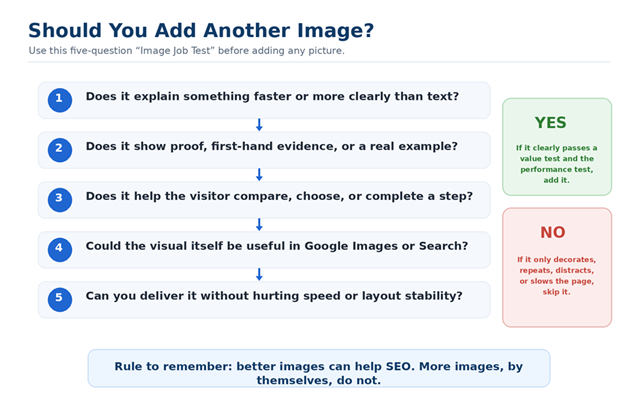
Image needs differ by page type
| Page type | Images that usually earn their place |
| Simple answer page | Only visuals that clarify the answer; do not add images simply to break up text. |
| Tutorial / how-to | Screenshots or diagrams at the exact steps users are likely to misunderstand. |
| Research / data article | Original charts, graphs, tables, and visual summaries tied to the data. |
| Comparison page | Side-by-side examples, annotated screenshots, or decision graphics. |
| Local service page | Real projects, team, work-in-progress, location evidence, or before/after proof where relevant. |
| Product page | Useful angles, details, use cases, scale, close-ups, and product information visuals. |
| Case study | Screenshots, before/after evidence, charts, and proof tied to the claimed result. |
Which Types of Images Are Best for SEO?
Start with the image type that best solves the user’s problem, not the type that looks most “SEO.” In most informational content, these are the highest-value options:
- Original screenshots — ideal for tutorials, interfaces, reports, and proof.
- Diagrams and flowcharts — useful when a process or relationship is hard to explain in prose.
- Charts based on real data — useful for research, trends, comparisons, and citation-worthy insights.
- Real photographs — important for products, local businesses, facilities, projects, people, and real-world evidence.
- Before-and-after visuals — powerful when the change can be shown honestly and the comparison is fair.
- Comparison graphics — useful when the user is deciding between options.
- Stock photos — not automatically bad, but weak when the page needs explanation or proof. Use them only when they genuinely improve communication.
The Complete Image SEO Checklist
Once the image has a real purpose, optimize it in this order. This prevents a common mistake: spending time on filenames and alt text for a picture that never needed to be on the page.
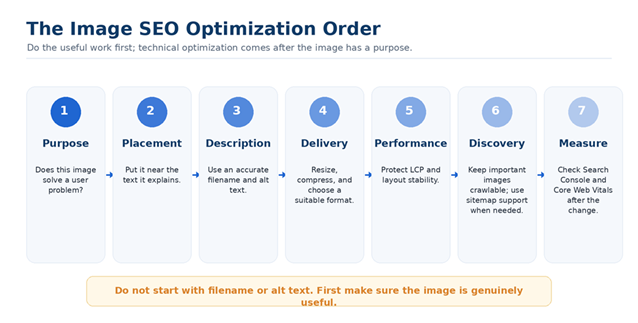
1. Use a descriptive filename
A filename can provide a small amount of context. Keep it short and human-readable. “google-search-console-image-search-report.webp” is more useful than “IMG_83992.webp.” Do not create long keyword-stuffed filenames.
2. Write accurate alt text
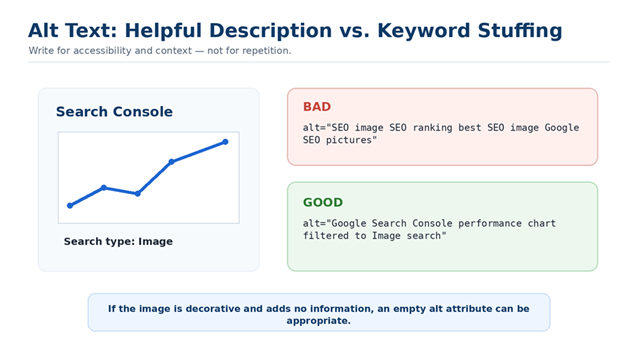
Alt text is primarily an accessibility and description tool, and Google also uses it as a source of image context. Describe what the image actually shows in the context of the page. Do not turn it into a list of target keywords. If an image is purely decorative and conveys no information, an empty alt attribute may be appropriate.
3. Put the image near the text it explains
This makes the page easier to understand and gives the image stronger context. If a chart belongs to a section about image-search performance, place it there—not three sections later because the layout happened to have space.
4. Choose a suitable file format
WebP and AVIF can often reduce transfer size while keeping good visual quality. JPEG remains practical for many photographs; PNG is useful when you need transparency or lossless graphics. The file extension itself is not a ranking bonus. Choose the format that delivers the needed quality efficiently.
5. Resize before upload and use responsive delivery
Do not upload a 4000-pixel image just to display it at 800 pixels. Resize to a sensible maximum and let responsive image markup such as srcset help browsers choose an appropriate version for the device.
6. Protect LCP and CLS
Do not lazy-load the main above-the-fold image if it is likely to be the LCP element. Do lazy-load genuinely below-the-fold images where appropriate. Include width and height attributes so the browser can reserve the correct space and avoid layout jumps.
7. Keep important images crawlable
Google needs to be able to fetch important image URLs. Do not accidentally block them with robots rules or inaccessible delivery. If your important images are difficult for Google to discover—such as images surfaced mainly through JavaScript—an image sitemap can help discovery.
Google image sitemap documentation
8. Use structured data only where it matches the page
If the page is an article, product, recipe, or another supported content type, use the structured data that accurately describes that content and its images. Do not create unrelated schema simply to make the page look “more optimized.”
Alt Text for SEO: Good vs. Bad Examples
Good alt text is specific enough to be useful but not stuffed with terms. Think about what a visitor using a screen reader would need to know and what description accurately connects the image to the surrounding section.
| Image | Weak alt text | Better alt text |
| Screenshot of a Search Console report | SEO image SEO ranking image | Google Search Console performance report filtered to Image search |
| Diagram showing an image decision test | image SEO tips | Decision tree for deciding whether another picture adds user value without hurting performance |
| Photo of a real completed project | best company service London | Completed storefront signage project at a London retail location |
5 Image SEO Myths to Ignore
Myth 1: More images automatically mean better rankings
Reality: useful images can strengthen a page; raw count is not the objective. Adding six decorative pictures to match a competitor is not a strategy.
Myth 2: You need one image every X words
Reality: Google does not publish a universal image-to-word ratio. Add visuals where the user needs to see something, not where a formula tells you the next image is “due.”
Myth 3: Images improve rankings because they increase dwell time
Reality: pictures can improve usability, comprehension, trust, and task completion. Do not present “more dwell time = higher ranking” as a confirmed simple formula. Focus on the user problem you are solving.
Myth 4: EXIF data is an image-ranking trick
Reality: do not build an SEO plan around EXIF metadata. Google said in its January 2023 SEO Office Hours that it was not using EXIF data and instead used IPTC image metadata for the image metadata features it discussed. Use genuine first-hand images because they provide real value—not because you expect EXIF fields to create a ranking signal.
Google SEO Office Hours: EXIF data
Myth 5: Every image must be under a specific KB limit
Reality: there is no one-size-fits-all number. Optimize each asset for its purpose, dimensions, visual complexity, and device delivery. A tiny icon and a detailed product photo have different needs.
What About AI Overviews and AI Mode?
Do not create a second, artificial set of “AI image SEO” rules. Google’s current guidance says the fundamentals remain the foundation: make unique, valuable content; ensure Google can crawl the page; and support text with high-quality images and video when useful. Relevant visual content can create additional opportunities in generative Search experiences, but there is no special markup that guarantees inclusion.
How to Know Whether Adding Images Actually Helped
This is where most articles stop too early. Adding pictures is only an SEO improvement if the result is better. Measure before and after instead of assuming.
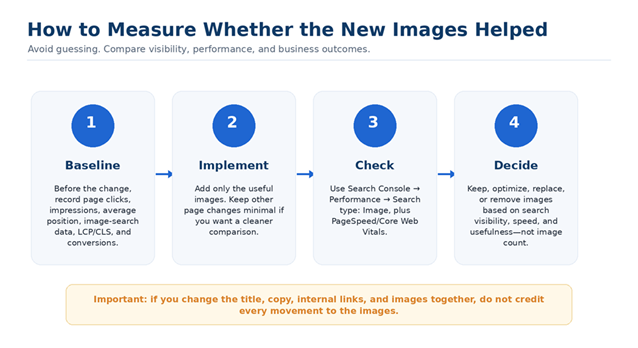
Step 1: Record a baseline before you change the page
- Google Search clicks and impressions for the page
- Average position as a directional metric
- Image-search impressions and clicks
- Core Web Vitals / PageSpeed data, especially LCP and CLS
- The conversion or task-completion metric that matters for the page
Step 2: Check Image search separately in Search Console
In Search Console, open the Performance report and change Search type to Image. Google’s own help documentation confirms that this view can show how your site performs in Google image search. Use the Pages and Queries views to understand which landing pages and searches are generating that visibility.
Google Search Console: view Image search performance
Step 3: Check performance after the images are live
Use PageSpeed Insights and Search Console’s Core Web Vitals report. If image-search visibility improves but LCP becomes worse, you have not finished the job; optimize delivery. If the page becomes slower and the new images add no search or user value, remove or replace them.
Step 4: Do not confuse correlation with causation
If you changed the title, rewrote half the article, added internal links, improved the hero image, and earned links at the same time, you cannot reasonably credit the ranking movement to “adding more pictures.” Keep changes focused when you want to learn what actually mattered.
Real-World Decisions: Should You Add Another Picture?
Scenario 1: A 1,500-word tutorial has a confusing text-only step
Add a screenshot or diagram at that step. The visual solves a comprehension problem and gives the reader something the text was not doing well enough.
Scenario 2: An 800-word article already has three generic stock photos
Do not add five more. Ask whether one of the existing photos can be replaced with a useful diagram, screenshot, comparison, or real example. Fewer, better visuals may improve the page.
Scenario 3: A local service page only shows city skyline photos
Replace some of the generic imagery with real work, people, projects, locations, or proof—only where you have genuine material and permission to use it. The goal is to answer the visitor’s trust questions, not to “send local signals” through photo metadata.
Scenario 4: A comparison page explains two options in long paragraphs
Add a side-by-side table or visual comparison. That helps users make the decision faster and gives the page an original visual asset that matches the intent.
Final Answer: Should You Add More Pictures?
Add another picture when it solves a real user problem. Do not add it because a competitor has six and you only have four.
- Add it if it explains, proves, compares, or demonstrates something.
- Add it if it creates genuinely useful visual-search value.
- Optimize it so the visitor does not pay for the extra value with a slow or unstable page.
- Skip it when it is repetitive, decorative, generic, distracting, or only there to hit an imagined image quota.
| The one-line rule Better images can help SEO. More images, by themselves, do not. |
Frequently Asked Questions
Do images improve SEO?
They can. Useful, crawlable, well-optimized images can create Google Images visibility, strengthen the usefulness of a page, support relevant search features, and make information easier to understand. Raw image count is not the goal.
How many images should a blog post have?
There is no universal number. Use as many as the reader needs to understand the topic, and no more. A tutorial may need many screenshots; a simple answer may need very few.
Can too many images hurt SEO?
Yes, when they create heavy downloads, poor LCP, layout shifts, clutter, or unnecessary scrolling. The problem is the effect of the images, not a fixed count.
Does image alt text help SEO?
Alt text improves accessibility and helps describe the image in context. Write an accurate description; do not stuff keywords.
Are stock photos bad for SEO?
Not automatically. They are weak when the page needs explanation, evidence, or uniqueness. Original screenshots, diagrams, charts, and real photos often provide more value.
Is WebP or AVIF better for SEO?
Neither receives a ranking bonus for the file extension. Modern formats can reduce transfer size, which can help performance. Choose the format that delivers the required visual quality efficiently.
Should I lazy-load every image?
No. Lazy-loading below-the-fold images can be useful, but you generally should not lazy-load the primary above-the-fold image if it is likely to be the LCP element.
Should every image be in an image sitemap?
No. Image sitemaps are especially useful when important images may be difficult for Google to discover. Standard crawlable images on ordinary pages often do not need special treatment.
Does EXIF data help image SEO?
Do not rely on EXIF as an SEO ranking lever. Use real, original images for the value they provide to users and the page, not because you expect camera metadata to boost rankings.
| Need a second opinion before adding more images? If a page already has traffic but you are unsure whether its next improvement should be content, images, internal links, or technical fixes, SEO Findings can review the page and prioritize the changes most likely to matter. Keep the CTA relevant to the reader; do not interrupt the article with repeated sales blocks. |